Finally setting up onsite and offsite backups with PBS
I’ve been meaning to setup backups for a very very long time, so I figured it was finally time to setup a proper system with a Mini PC and 1TB NVMe SSD I had lying around.
Hardware Changes#
I removed the bottom cover of my Mini PC then swapped out the original 256GB SSD and replaced it with a fresh 1TB one which is identical to the one in my live Proxmox node.
Software Configuration#
For its intuitive interface, incremental backup system and tight integration with Proxmox VE, I chose to install Proxmox Backup Server (PBS)
On PBS I setup a datastore on my disk which stores all VM backups, then configured it as an endpoint on the Proxmox VE server.
Additional Notes#
- When adding it as an endpoint you need to fill in the fingerprint box otherwise It’ll fail, which you can get by running this command on PBS
proxmox-backup-manager cert info | grep Fingerprint | awk '{print $3}`
- For extra security, create a dedicated user account in PBS instead of using
rootto handle backups.
Syncing Offsite#
I followed this guide to help me setup syncing PBS to a Backblaze bucket, this kind of hybrid setup allows me to safely store everything in the Cloud while being able to restore backups super fast from a local copy.
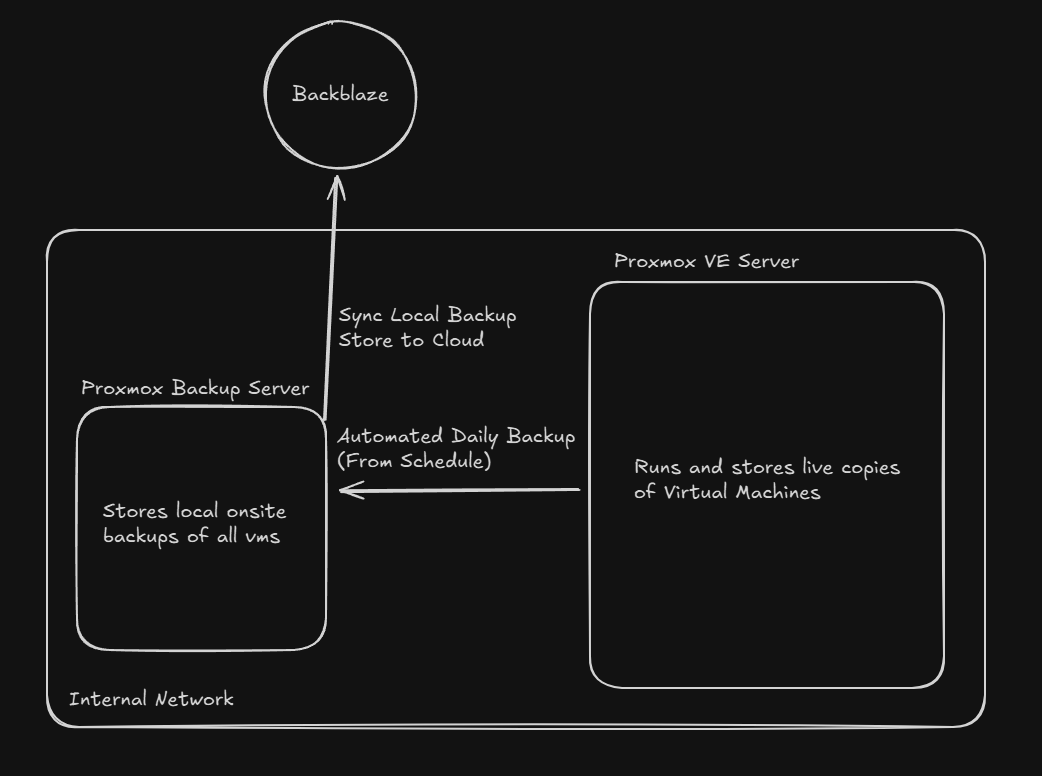 Diagram showing backup flow from the live VM disks to the onsite PBS and offsite storage.
Thanks for reading :)